
BGMI No recoil sensitivity code (3 easy steps)
If you have recently started playing this game you might have noticed that there is a thing called sensitivity, sensitivity is one of the most crucial parts of the game. It helps you to control the recoil of your gun. But before we talk about sensitivity, let’s understand some important things first.
If you have started playing games and you do not know much about sensitivity, let me tell you that there may be so many options and you might be confused, but before understanding sensitivity you must know about gyroscopes. There is an option in your game called gyroscope.
Basically gyroscope is a sensor that calibrate when you move your device it is available in your smartphone, so gyroscope help a lot by playing FPS game, when you are in middle of a fight and when you aim at your opponent and fire you miss feel some recoil but when you use gyroscope you can see that the recoil is almost reduced.
GYROSCORE OPTIONS IN GAME
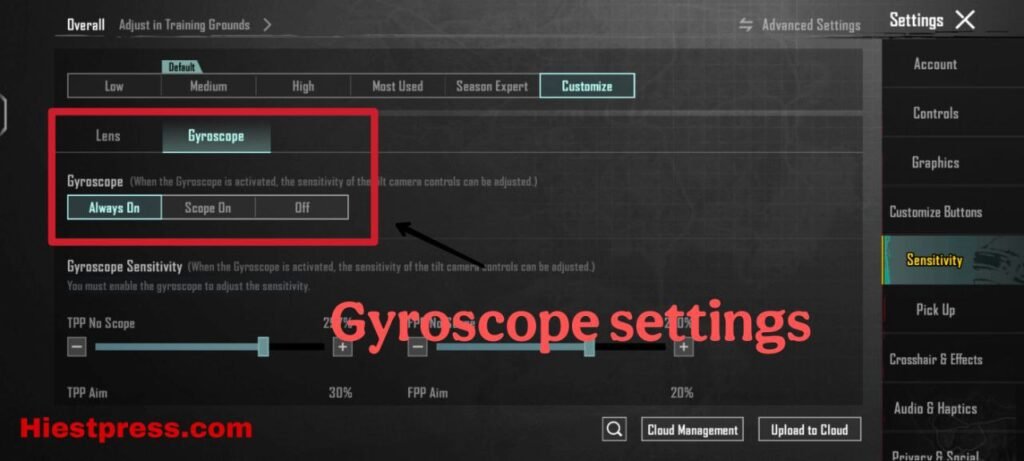
As you can see in the upper photo that there are two options of GYROSCORE in game
One is Scope on and other is Always on as by the name you can understand the meaning but if you haven’t yet then let me help you understand
- Scope On – if you enable this option then gyroscope will be enabled only for the firearms means you if you tilt or move your smartphone while your scope is on then only the gyroscope will work
- Always On – as its name goes if you turn on Always On Gyroscope that means you’ll be able to use it every time in a match which really helps you a lot as it improves Aim accuracy and also helps in better movement.
So if you really want to know the secret for almost zero recoil sensitivity and a better Aim accuracy i’ll strongly recommend you to use Full gyroscope, now let’s move to our main topic
Now let’s start with Basic training for sensitivity.
There are two types of sensitivity i have already told you about gyroscope settings and you may already know about lens setting but if you don’t let me explain it to you in clear words
LENS SENSITIVITY
Lens sensitivity is the sensitivity that we use while playing like it is the sensitivity in which we use our fingers to move our aim on opponent it’s like when you drag your aim or change your position using your fingers not using Gyroscope,
Remember one thing if you want to find perfect sensitivity for your smartphone you have to play some games or try it in Arena or in Practice mode
If you have too much high lens sensitivity when you move your character or swipe of your screen it may pass the opponent,
GYROSCOPE SENSITIVITY
I have already told you so much about the gyroscope above this post, but remember this if you manage to use both gyroscope and lens sensitivity perfectly together you’ll aim like a hacker,
Now let’s talk about ADS which are one of the most important thing in your game but you may have missed it,
ADS settings
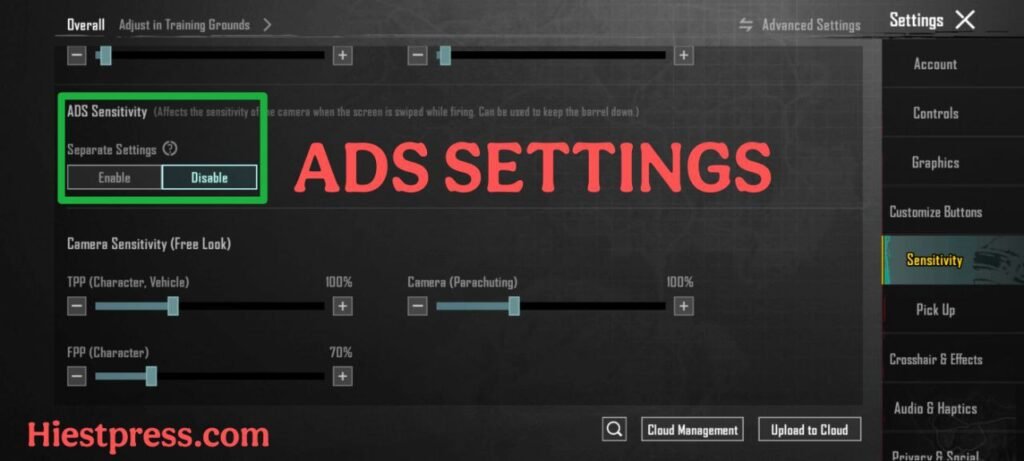
If you don’t know the meaning so ADS stands for “Aim Down Sight” which means when this settings apply when you click on the fire button that means if you want to customise even more than you can change ads settings for both gyroscope and lens, it can help you to reduce the recoil even more for your firearms,
I’ll ask you to reduce the ads sensitivity so you can easily connect your ammo to your opponents, but don’t reduce it so much that it becomes very hard to control.
Sensitivity for every gun ( Bonus tip )
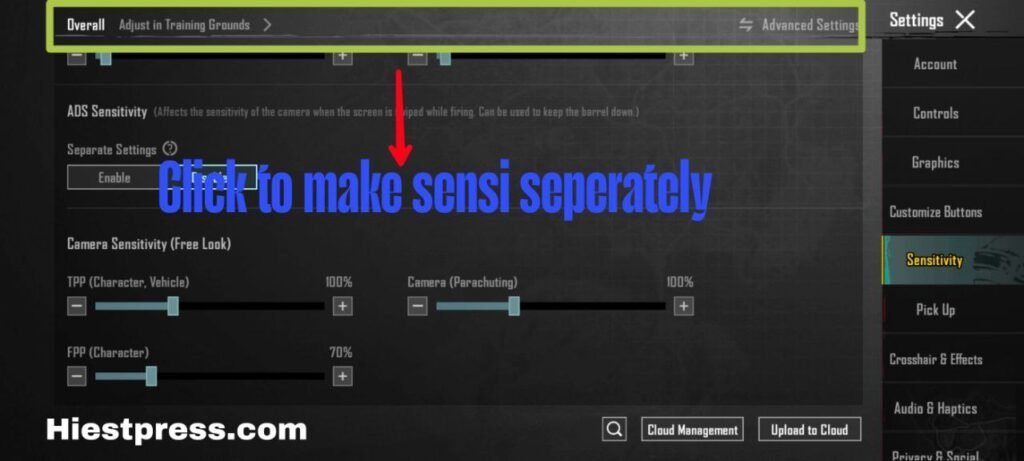
You all must have faced the issue where you change the sensitivity for one firearm but due to that change the sensitivity of other firearms got affected.
Example – you know that the recoil of akm is much higher than uzi or any smg gun, if you change the sensitivity for uzi then this will affect akm sensitivity so
But worry not my friend I have a solution for this so you can easily change sensitivity for your guns according to yourself.
Here is a quick guide step by step so you can do it yourself.
- Open your Game
- Go to settings then click on sensitivity
- You’ll see an option of advance setting there
- Select your weapon type and also select the specific firearm and change the sensitivity
You can see there is an options of ADS settings too you can customise it too,
Sensitivity code
Yeah I know you all have come for this code but remember one thing that this Maybe this sensitivity will not work on your device. As everyone have different devices and have different sensors :- 1-7527-1381-4910-6976-466
CONCLUSION
This is all for now guys I have explained everything you need to know about controlling your recoil in your game, I have explained all the basic things of this game and I can give you surety that you’ll definitely find improvement in your game play and you’ll also become MVP of so many matches,
If you have any other concern or queries you can contact me on my contact page click here for that
:- contact us
also checkout :- How to become a pro in BGMI